
For the list of all release notes click here.
The following list will give a quick overview about the newest improvements that contentACCESS version 7.2 brings to you:
Common
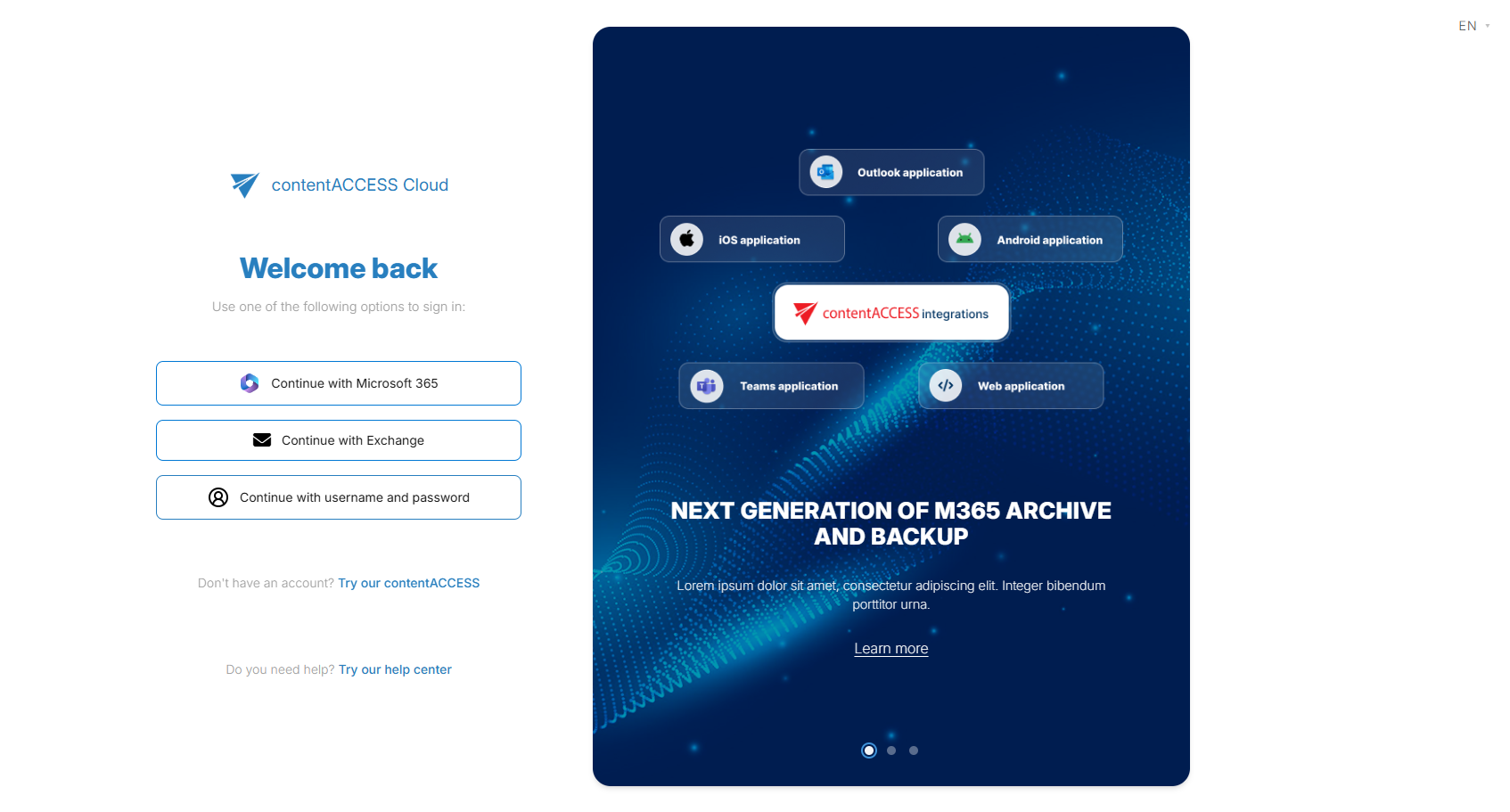
✓ Authentication and sign-in
contentACCESS 7.2 continues the platform-wide modernization by introducing a fully redesigned sign-in experience. This update goes beyond technical changes and focuses on usability, responsiveness, and performance. Administrators and end users benefit from a clean, modern look combined with noticeably faster loading times, making access to the platform quicker and more intuitive.
A new capability allows administrators to define the order of available login providers—such as Microsoft 365, Windows authentication, or Forms-based login. This makes it easy to guide users toward the preferred authentication method and create a clearer, more consistent sign-in experience.
To further reduce administrative overhead, a built-in password reset flow is now available. Users can securely reset their own passwords without contacting an administrator, improving both security and user satisfaction.
Authentication with Microsoft 365 has also been simplified. Previously, contentACCESS required a multi-tenant application registration in Microsoft Entra ID. With the new login application, administrators can now choose between multi-tenant authentication – allowing users from different domains to sign in – or a single-tenant configuration that restricts access to users within one Microsoft 365 tenant.
IMPORTANT NOTE:
As announced earlier by email, the new sign-in experience introduces protocol-level changes that affect how client applications authenticate. To ensure a smooth and uninterrupted sign-in experience, please update all client applications (officeGATE and contentACCESS Mobile) to version 7.2 or later before upgrading the server.
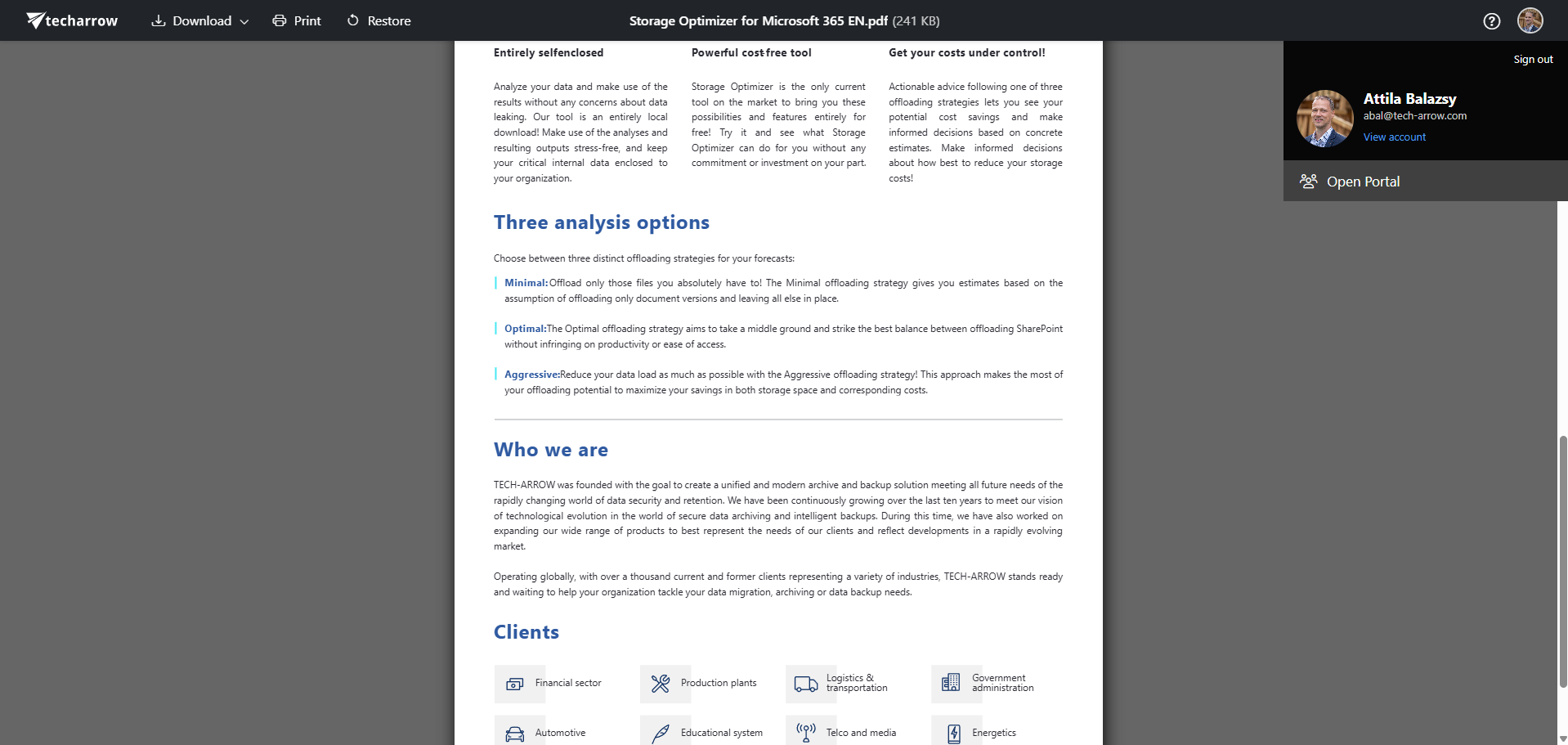
✓ Enhanced Document Preview and Restore
The Document Preview portal has been visually refreshed and enhanced with new functionality. A user menu is now available for the currently logged-in user, displaying the user’s name, email address, and profile picture, and providing a direct link to the main archive portal for seamless navigation between preview and full archive management.
In addition, the preview portal now supports document restore operations. Authorized users can restore documents directly back to their source system without leaving the preview. Access to this functionality is controlled through role permissions, ensuring that only users with manual restore rights can perform these actions.
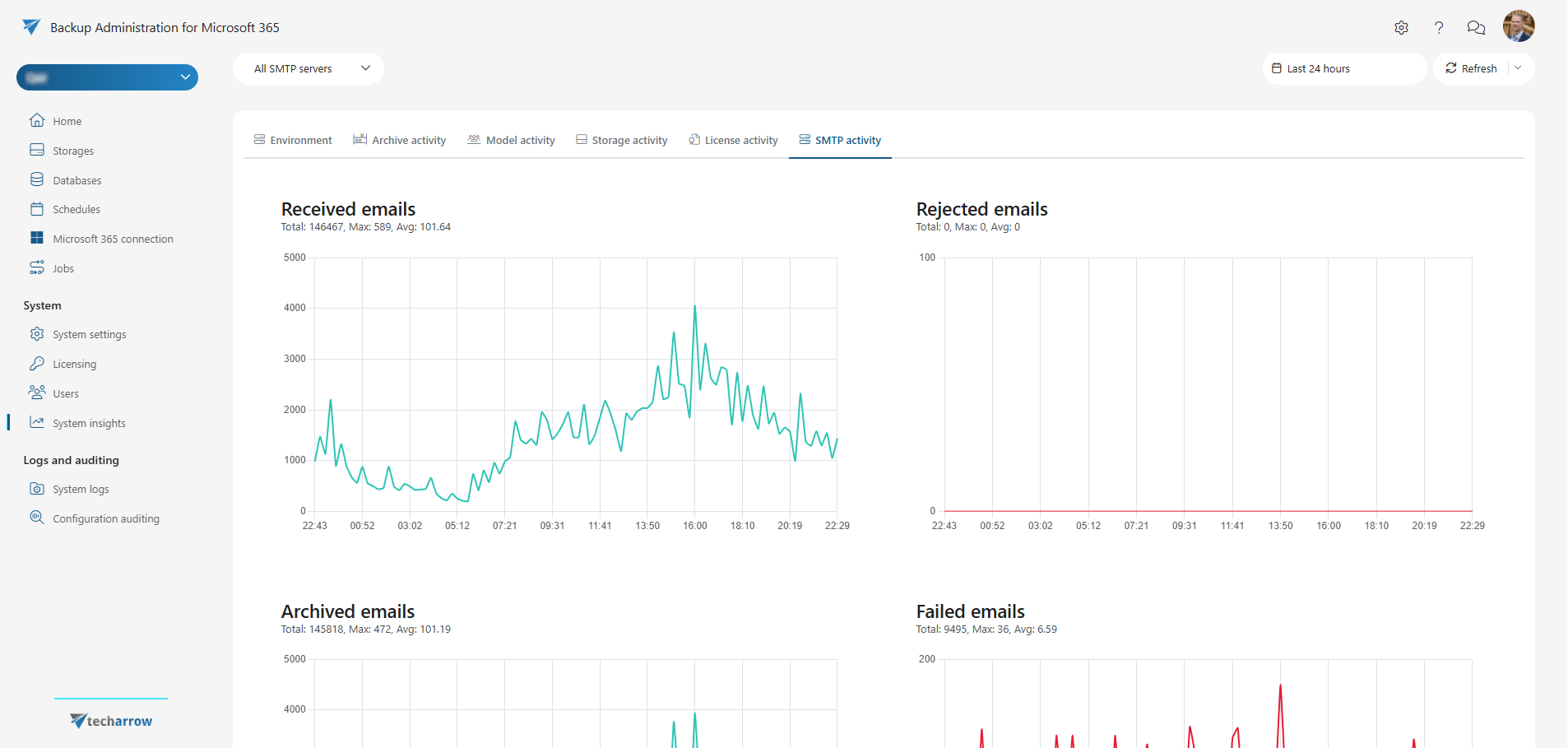
✓ SMTP Telemetry and mail flow visibility in System Insights
System Insights, introduced in contentACCESS 7.1, provides real-time visibility into system health, performance, and operations. With contentACCESS 7.2, this visibility is extended to include telemetry data from the contentACCESS SMTP server.
Administrators can now monitor key SMTP metrics directly within System Insights, including received email counts, rejected emails, successfully archived messages, archiving failures, and the number of emails waiting in the archive queue. This deeper insight helps teams quickly identify bottlenecks, validate mail flow health, and proactively address issues before they impact users.
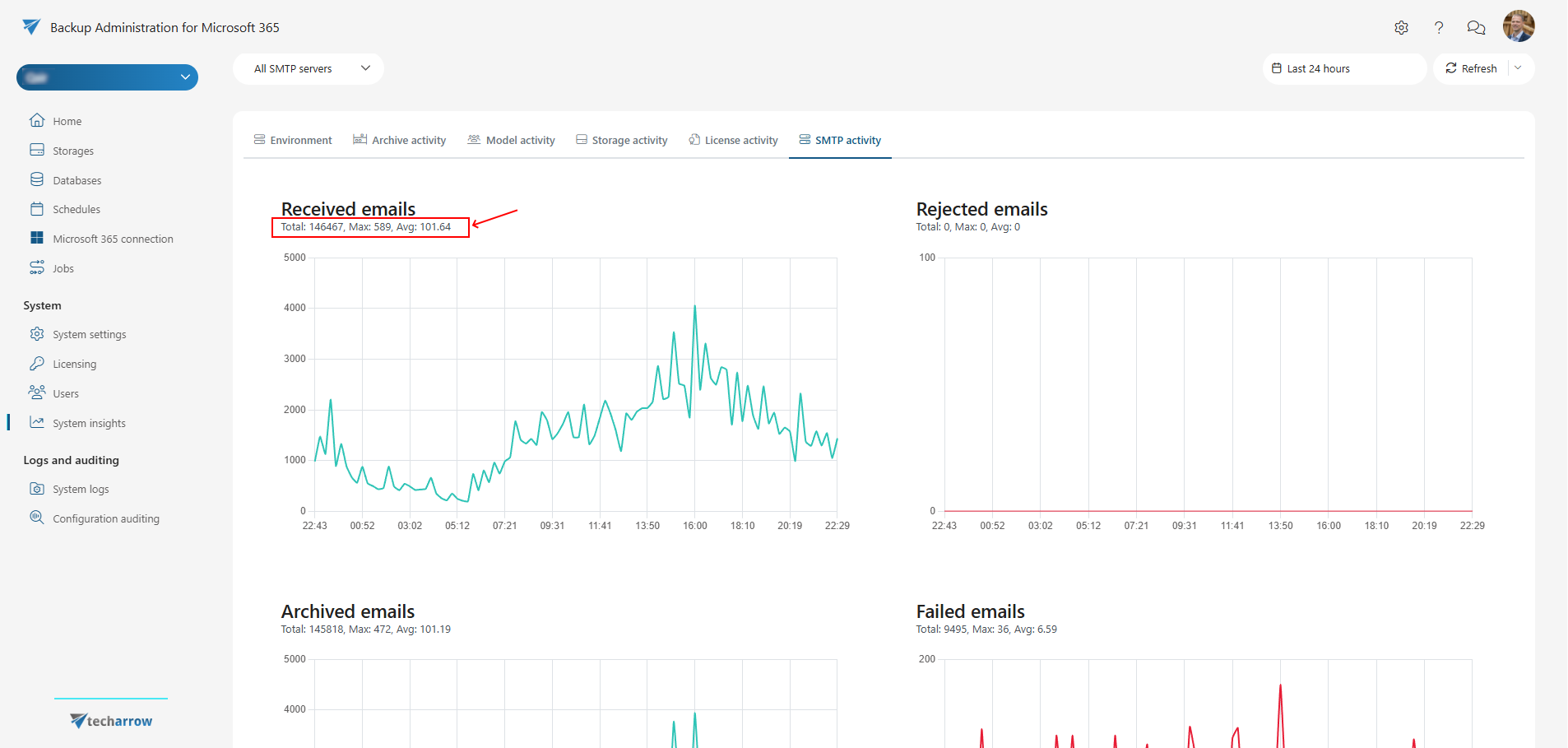
✓ Aggregated values in System Insights
While time-series charts are excellent for identifying trends and anomalies, administrators often need a quick summary view to confirm that everything is running smoothly. System Insights now complements its detailed charts with aggregated values for the selected time period.
These aggregated numbers provide an instant health snapshot, while the underlying time series still reveal exactly when issues occurred. Together, they enable faster assessment, clearer reporting, and more confident operational decisions.
SharePoint archive
✓ Introducing Modern SharePoint shortcuts
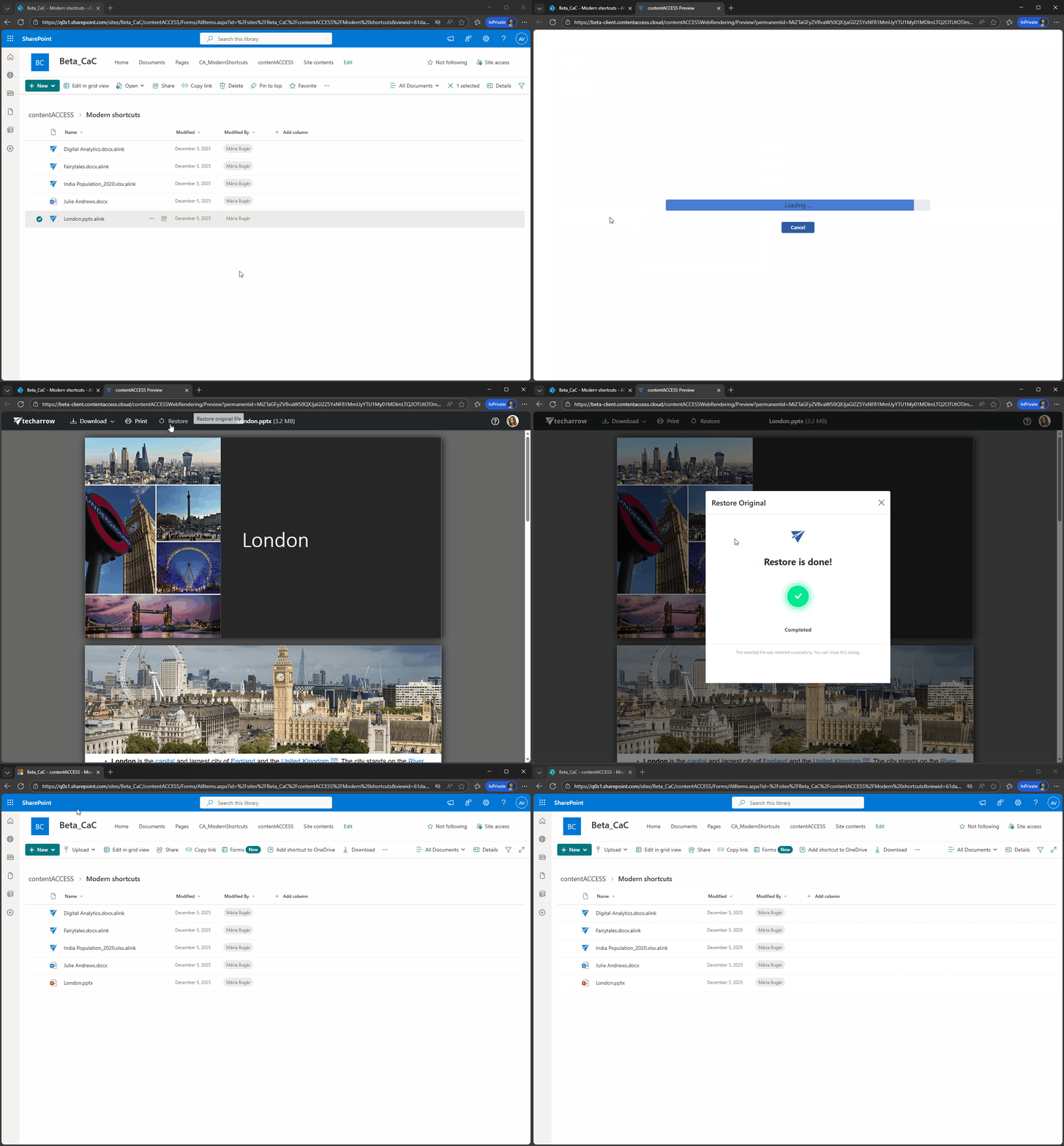
contentACCESS 7.2 introduces a new generation of SharePoint shortcuts based on Microsoft 365 File Handler technology. These modern shortcuts integrate directly into the native SharePoint and Microsoft 365 experience, making access to archived documents feel almost identical to working with original files.
Compared to classic shortcut formats, modern shortcuts are dramatically smaller—typically reduced from around 5 KB to approximately 500 bytes. This keeps SharePoint libraries lean while maintaining seamless access to archived content.
For end users, file access becomes nearly transparent. Shortcuts behave naturally in SharePoint, standard actions work as expected, and there is no need for workarounds such as opening files in a new tab. To avoid confusion, modern shortcuts are clearly marked with contentACCESS icons, making archived items instantly recognizable.
Restore workflows are also significantly improved. Documents can be restored directly from the SharePoint file context menu, and multiple items can be restored in one operation using multi-select. This greatly reduces the effort required for large-scale restore scenarios.
Deployment is handled at tenant level using the Microsoft 365 File Handler approach. This ensures a consistent shortcut experience across SharePoint, OneDrive, and Teams, helping organizations standardize archived file access throughout Microsoft 365.
To support a smooth transition, a new shortcut repair job is available that can convert existing HTML-based shortcuts into the new modern file handler shortcuts.
✓ Windows File Handler for contentACCESS Modern Shortcuts
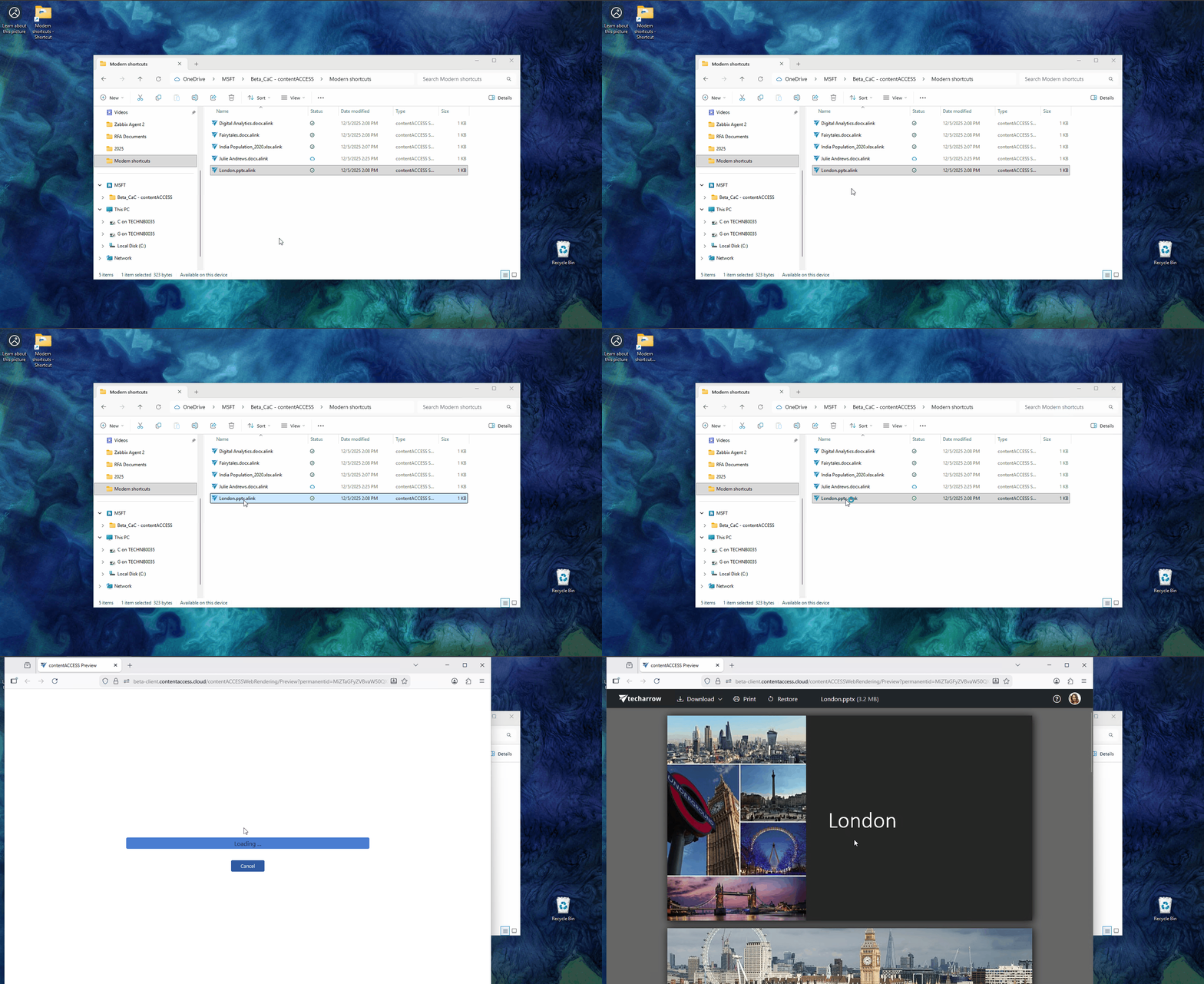
contentACCESS replaces rarely used SharePoint, OneDrive, and Teams documents with lightweight .alink shortcut files, keeping Microsoft 365 storage lean while maintaining seamless access to archived data.
While Microsoft 365 can already open these shortcuts in the browser, Windows does not recognize .alink files when they are downloaded or synced locally.
The new contentACCESS File Handler for Windows bridges this gap. It registers a Windows file association for .alink files and automatically redirects users to the contentACCESS Shortcut Handler service when opened on a PC.
Users can then:
– Preview documents
– Restore documents
– Download documents
This ensures a consistent and intuitive experience—whether users access content in the browser or from a locally synced library.
✓ SharePoint archive performance optimization
contentACCESS 7.2 includes a fully rewritten SharePoint connector for SharePoint Online. This modernization delivers more than double the data access performance, improves overall robustness, and expands support for modern SharePoint Online capabilities.
To focus on these improvements, this update currently targets SharePoint Online environments. Support for SharePoint Server on-premises will be reintroduced in a future release. Organizations that rely on on-premises SharePoint should continue using contentACCESS 7.1 until updated support becomes available.
Email archive
✓ contentACCESS Outlook Forms without ActiveX
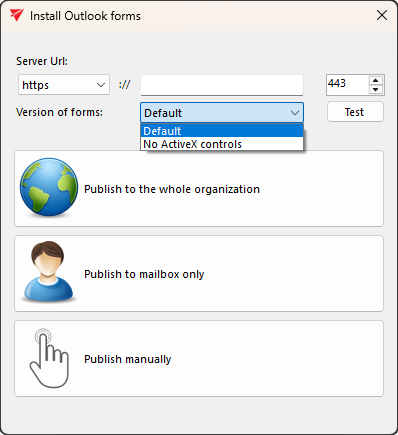
To support modern security standards and environments where ActiveX controls are restricted or disabled, the contentACCESS Outlook forms installer now offers an option to deploy a version of the Outlook forms without ActiveX components.
This gives administrators greater flexibility when rolling out contentACCESS in secured or hardened environments. If ActiveX controls are disabled in Outlook and users open an email archive shortcut, Outlook will display an additional warning indicating that certain form components were removed.
Please note that when using the Outlook form without ActiveX, preview functionality depends on the form’s ability to download the archived email. If the form cannot download the email, no preview will be displayed.
contentACCESS continues to support the existing Outlook forms with ActiveX, allowing you to choose the deployment model that best fits your organization’s security and compliance requirements.
✓ SMTP zero-day deletion
The contentACCESS SMTP server processes incoming emails by first placing them into an archiving queue and marking them for deletion after successful processing. Previously, archived emails were retained for a minimum of one day before deletion, which could lead to increased storage consumption in high-traffic environments.
With contentACCESS 7.2, the SMTP server now supports zero-day deletion. Successfully archived emails can be removed almost immediately after processing, significantly reducing temporary storage requirements and helping organizations better control storage usage under heavy mail loads.
✓ MailApp uses the Outlook language as default
We made a small but important change to how mailApp sets the default language. Previously, the default language was hard-coded to English, and users had to change it manually based on their preference. Now, mailApp uses the user’s Outlook language as the default. Users can still change it to any other supported language in the mailApp configuration.
Update from older versions
✓ Update path: The update is supported by contentACCESS version 5.0 and later. Older versions must first be updated to contentACCESS 5.0 and after that they can be updated to the latest version.
If the update has been done for an earlier version than 3.3, after the update some of the new features must be configured manually.
One of these features is the Task runner, which requires resource storage where the export files will be stored. This storage must be configured in System -> System -> Resource storage settings. This store must be accessible by all contentACCESS nodes inside a cluster, so it is highly recommended to use a network share.
✓ .NET updated: In contentACCESS 7.2 all .NET Core based projects were updated to .NET 9. This affects the following components: Document Preview, Search V2, Administration UI (New), SharePoint Shortcut Handler, Login.
✓ SQL Server 2022 is required for System Insights: In contentACCESS 7.1, we have introduced the new System Insights feature, which requires either Timescale over Postgres or Microsoft SQL Server 2022 (or higher).
✓ .NET updated: In contentACCESS 7.0 all .NET Core based projects were updated to .NET 8. This affects the following components: Document Preview, Search V2, Administration UI (New).
✓ TLS 1.1 and older is disabled: In contentACCESS 6.1 and later the TLS versions older than 1.2 are disabled for security reasons
✓ Modern authentication for Email archive needs more permissions: we have switched from the deprecated Remote PowerShell to a REST based management API, which requires some more permissions on the configured Azure AD application
✓ Search V2 requires .NET Core: In 6.0 we have introduced the next version of search. The new search components targets .NET Core 6, which will be installed automatically by the search server setup.
✓ Teams and Teams chat job filter must be adjusted: In 5.4 we have fully redesigned the filtering capabilities in all Teams and Teams Chat jobs. Your existing Teams and Teams Chat jobs settings must be verified and adjusted after the update from 5.3 and earlier.
✓ Application pool identities changed: To increase the security, all application pools of contentACCESS are using the isolated IIS App Pool Identity. This requires a switch to the server-side rendering in contentACCESS Portal for email archive.
✓ .NET Framework support: From the 5.0 version, the minimum required .NET version for all applications was increased from 4.5.2 to 4.8.
✓ Mail app activation: As a result of redesigning the Mail app activation method in contentACCESS Email Archive, new permissions: “Org Marketplace Apps” and “User Options”, are needed to make the super user work correctly.
✓ Outlook forms: If the update has been done from an earlier version than 3.4, because of some internal changes in the email archive shortcut format, the Outlook forms must be updated to the latest version to maintain the correct functionality. For contentACCESS 3.8, the Outlook forms must be also republished due to the authentication changes.
✓ Remote file archiving: While updating from contentACCESS 3.6, existing remote agent definitions will be not working, since some of the database structures have been moved from the file system archive database to the tenant database.
✓ SQL server support: The minimum required SQL version was increased from MS SQL 2008 to MS SQL 2012.
✓ Redesigned filtering: The old filtering was converted to a new format. Therefore, after the update from 3.7 or earlier, we recommend the checking of all your job filtering settings.
Documentation
Please check the updated documentation and manuals.
 contentACCESS and client apps user manuals
